The booking management system allows you to organize the entire process of online booking for your services. You can easily view and edit schedules, confirm or cancel client requests, and automatically send notifications about the booking status. This is an excellent way to minimize errors and increase customer satisfaction.
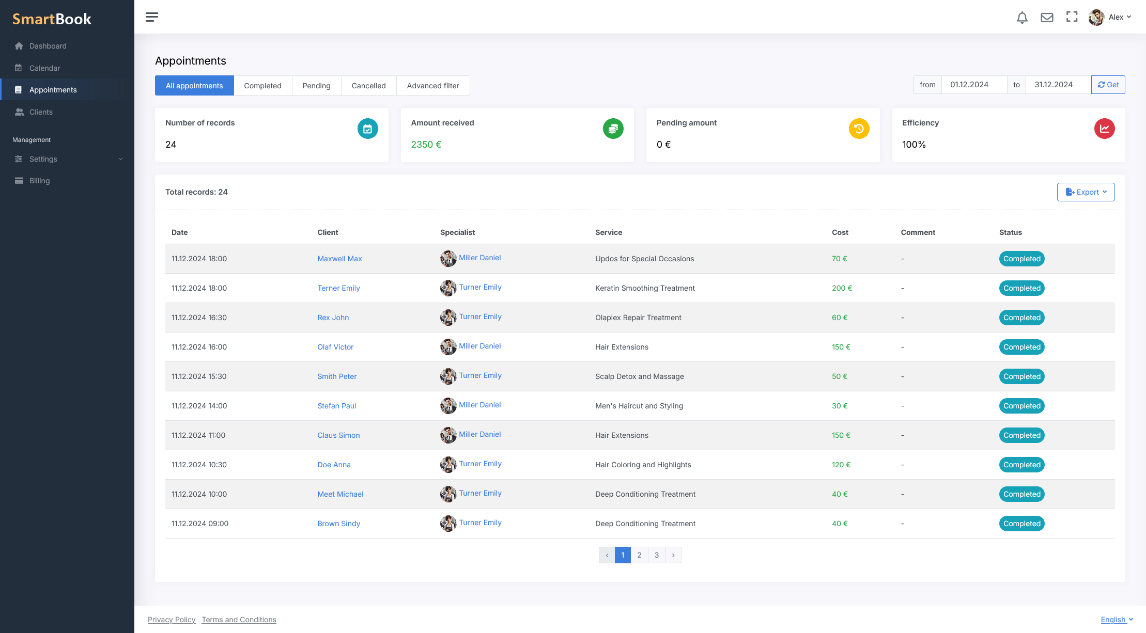
Automation of Booking and Error Elimination
- Finding Available Time Slots. The system shows available time slots in real-time, taking into account the company's schedule, staff availability, and the specifics of each service. This eliminates the issue of overlapping or duplicate bookings.
- Considering Service Types and Durations. For each service, you can set its duration and assign staff qualified to provide it. The system automatically selects the best time, ensuring clients don’t have to wait and specialists don’t have idle time.
- Recording Client Data. When a booking is made, the client’s contact and personal details are saved. This simplifies repeat bookings and helps quickly retrieve information about the client’s history.
Schedule Optimization and Load Control
- Planning Staff Work Schedules. You can set individual schedules for each specialist, and the system will automatically distribute bookings based on availability and desired workload.
- Load Reports. Visual reports on the number of bookings, staff workload, and service popularity are available for analyzing efficiency and planning workforce expansion.
- Reducing Administrative Burden. Staff and administrators spend less time manually managing bookings and answering calls, freeing up resources for more productive tasks.
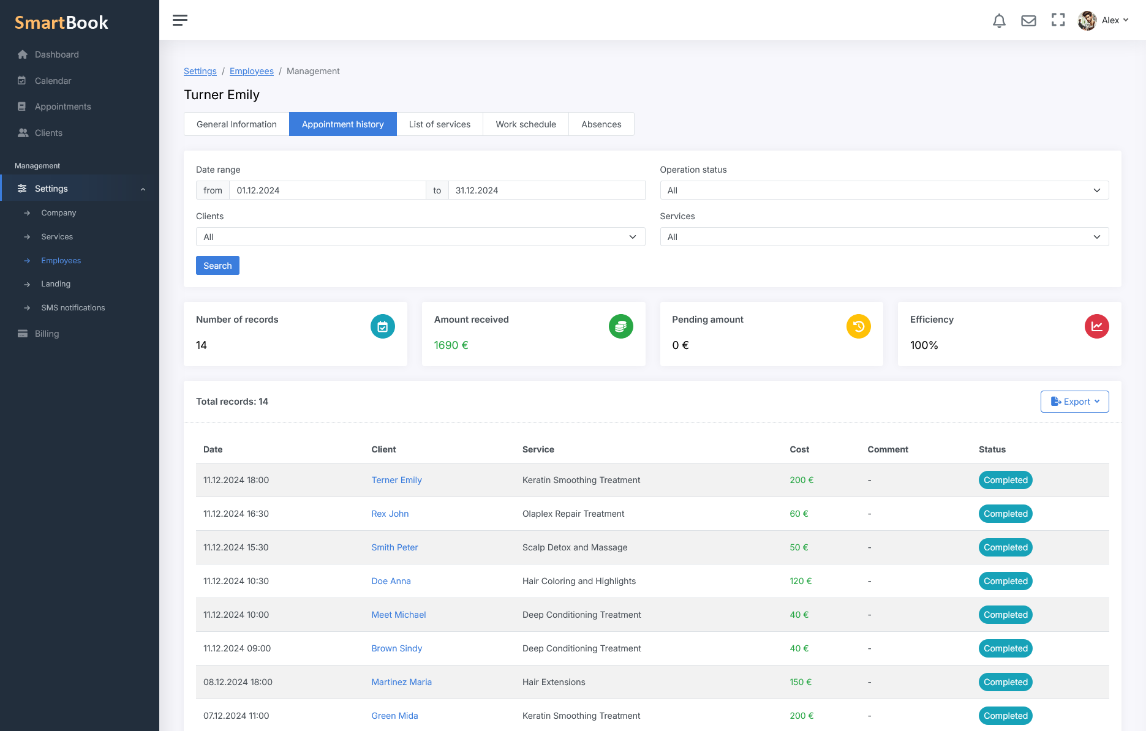
Client Management: History and Preferences
- Keeping Booking History. The entire history of a client’s interactions — what services they ordered, when they visited, and which specialist they were assigned to — is stored in the system. This helps to provide a personalized approach to every client.
- Analyzing Preferences. By knowing clients’ preferences, you can offer them relevant promotions and additional services, thus boosting loyalty and increasing sales.
- Quick Search and Repeat Bookings. Simplify the process of repeat bookings: the system “remembers” client details, making repeat reservations take just seconds.
Notifications and Reminders
- Staff Notifications. Specialists receive automatic notifications about new bookings and changes to their schedules. This prevents missed appointments and double bookings.
- Client Reminders. The system sends SMS reminders to clients about upcoming appointments. This reduces the number of late arrivals and last-minute cancellations.
- Flexible Settings. You can configure the timing and frequency of notifications, as well as choose the channels for reminders and booking confirmations.
Why Online Solutions Boost Efficiency
- 24/7 Availability. Your clients can book services at any convenient time, even when your office is closed.
- Attracting New Clients. The convenience of online booking becomes a key competitive advantage, helping to expand your customer base.
- Reducing Staff Workload. Your employees and administrators save time and can focus more on customer service instead of routine record-keeping tasks.
Booking management automates routine processes, helps monitor company workloads, and ensures convenience for clients. This is just one of the many features of the SmartBook system that allows you to optimize your operations and improve the quality of service. It helps you save time, avoid planning errors, and create conditions for building stronger customer loyalty.
Frequently Asked Questions
In the booking card, you can select the actions “Confirm” or “Cancel.” Once the status is changed, the system immediately updates the schedule and sends a notification to the client.
Yes. You can move a booking by dragging it in the calendar or using the “Edit” action. The full history is retained, and the client automatically receives a notification about the change.
SmartBook checks staff availability, working hours, and service duration in real time. If a conflict occurs, the time slot is blocked, and available alternatives are suggested.
Staff members receive notifications about new or modified bookings, while clients receive confirmations and visit reminders. Channels and timing are configurable, and reminders can be set to send hours or days in advance.
Yes. You can set how many days in advance clients can book, the minimum time before a visit, and buffers before or after a service. This helps balance workload and avoid scheduling conflicts.
Reports provide data on the number of bookings, staff workload, service popularity, and no-show rates. The data can be exported to Excel, PDF, or CSV for further analysis.